



You're posting on social media, running ads, sending emails, and publishing blog posts. Yet leads are flat, ad costs keep creeping up, and nobody on your team can say with confidence which channel is actually bringing in revenue.
This is the moment a digital marketing audit pays for itself. Instead of guessing, you review everything in an organized way and find out exactly where growth is leaking. In this guide, we'll walk you through the full process: what an audit is, the decisions to make first, a free checklist you can work through, what each channel should deliver, and how to turn your findings into a plan your team will follow. We've reviewed marketing setups for businesses of different sizes, and the same patterns keep appearing. Most problems are fixable once you can see them.
What Is a Digital Marketing Audit?
A digital marketing audit is a structured review of your website, tracking, content, and marketing channels to find out what's working, what's wasting money, and what's missing. The goal isn't a long report. It's a short, ranked list of fixes that will improve results.
You probably need one if any of these sound familiar:
- Website traffic has been flat or falling for several months
- Your cost per lead or cost per sale keeps rising
- Visitors arrive but few of them take action
- You can't tell which channel deserves more budget
- Different team members or agencies report different numbers
- Your last marketing review was more than a year ago
A digital marketing audit is different from a single-channel check such as an SEO audit. An SEO audit looks at search performance only. A full audit looks at how all your channels, your website, and your data work together.
4 Decisions Before You Start Your Audit
The quality of an audit depends on the preparation. Skipping these four decisions is the main reason audits turn into piles of data that nobody uses.
1. Define the goal and the numbers that prove it
Pick one to three business goals, such as more qualified leads, higher online sales, or lower cost per acquisition. Then choose the metrics that show progress toward each one. Revenue, leads, and cost per lead matter more than followers or page views.
2. Set your scope and time frame
Decide which channels and pages you'll review. Then pick a comparison window. We recommend looking at the last 6 to 12 months and comparing it to the same period a year earlier, so seasonality doesn't fool you.
3. Gather access and tools
Collect view access to your analytics, search console, ad accounts, social profiles, email platform, and CRM. Free tools cover almost everything you need, and we've listed the best ones in the tools section below.
4. Assign an owner and a schedule
Someone has to be responsible for finishing the audit and following up on it. Give that person a deadline, usually two to three weeks for a small or mid-sized business. We cover how often to repeat the audit in a dedicated section below.
What to Check in a Digital Marketing Audit
Start with the foundation. If your tracking is broken or your website is hard to use, every channel built on top of it will look worse than it really is. Work through these three layers in order, and tick each item as you go.
Tracking and analytics
Bad data leads to bad decisions, so verify this first.
- Analytics is installed on every page, and nothing is counted twice
- Key actions (form submissions, calls, purchases, sign-ups) are tracked as conversions
- Internal and spam traffic is filtered out
- Search Console is connected and verified
- Campaign links use consistent tags so you can tell sources apart
- Your numbers match across tools within a reasonable margin
Website experience
Your website is where every channel sends its visitors, so weak spots here cost you across the board.
- Pages load quickly on mobile (aim for main content in 2.5 seconds or less)
- The site is easy to use on a phone, with readable text and tappable buttons
- Every important page has one clear call to action
- Forms are short and work properly, including the confirmation message
- The site uses HTTPS and has no security warnings
- There are no broken links or error pages in your main navigation
If speed is a concern, our guide on how page speed affects sales walks through the fixes in detail.
Technical SEO and on-site basics
These basics decide whether search engines can find and understand your pages.
- Important pages are indexed, and unimportant ones are not
- An XML sitemap exists and is submitted
- Every page has a unique title tag and meta description
- Each page has a single, clear H1 heading
- Images have descriptive alt text
- Duplicate pages are handled with canonical tags or redirects
- Internal links connect related pages

What Each Marketing Channel Should Deliver
With the foundation checked, you can judge each channel fairly. The key question for every channel is the same: what job is it supposed to do, and is it doing it? A channel that looks busy but doesn't deliver is just a cost.
Organic search and content
What it should deliver: steady, growing traffic from people searching for what you offer, and a share of your leads and sales at no cost per click.
Check: which pages bring traffic and which bring conversions, whether your best content is still current, and which topics your customers search for that you haven't covered.
Red flag: traffic that grows but never converts, or key pages that haven't been updated in years. Local service businesses should also check their local visibility, and our guide on how to rank higher on Google Maps shows how.
Paid advertising
What it should deliver: predictable, profitable customer acquisition. Every campaign should have a target cost per lead or return on ad spend.
Check: cost per conversion by campaign, conversion rate on your landing pages, search terms that trigger your ads, and how well your audiences are targeted.
Red flag: ads sending traffic to a generic homepage, or spending that continues on campaigns nobody has reviewed in months.
Social media
What it should deliver: awareness, trust, and a path to your website or your inbox. Which of those matters most depends on your business, so decide before you measure.
Check: consistency of your branding and profile details, engagement rate (not just follower count), which content types perform best, and how many clicks reach your site.
Red flag: many followers but almost no clicks, comments, or messages. If your posting is inconsistent, a 30-day social media content calendar is an easy way to fix it.
Email marketing
What it should deliver: repeat business and nurtured leads. It's often your highest-return channel when it's managed well.
Check: list growth and health, click rate, unsubscribe and spam complaint rates, and whether automated emails (welcome, abandoned cart, follow-up) exist and work. Open rates have become less reliable since email apps started pre-loading messages, so lean on clicks and conversions.
Red flag: one big newsletter blast and no automation, or a list that hasn't been cleaned in a long time.
Best Free Tools for a Digital Marketing Audit
You don't need an expensive software stack to run a solid audit. These free tools cover the checklist above, and most small and mid-sized businesses can complete a full review with them alone.
|
Tool |
What it helps you audit |
Cost |
|
Google Analytics |
Traffic sources, user behavior, conversions |
Free |
|
Google Search Console |
Search rankings, clicks, indexing, and technical errors |
Free |
|
Google PageSpeed Insights |
Page speed and Core Web Vitals |
Free |
|
Screaming Frog SEO Spider |
Broken links, titles, meta tags, and duplicate pages (up to 500 URLs) |
Free version available |
|
Looker Studio |
Combining your data into one shareable dashboard |
Free |
|
Google Ads and Meta Ads Manager |
Ad spend, cost per conversion, and audience results |
Free to access |
|
Your email platform's reports |
List health, click rates, and automation performance |
Included with your plan |
Paid tools such as Semrush or Ahrefs add deeper competitor and backlink data. They're helpful once you've outgrown the basics, but they aren't required to start.
A quick tip: pick your tools before you begin and stick with them. Switching tools mid-audit can produce numbers that don't match, which makes the results harder to trust.
Turn Red Flags Into a Priority List
By now you'll likely have 30 or more findings. Trying to fix all of them at once is a recipe for fixing none of them. The next step is to sort them.
Step 1: Label each finding by severity. Use a simple traffic-light system:
- Red: actively losing money or leads (broken forms, missing conversion tracking, ads sending traffic to a dead page)
- Yellow: holding back growth (slow pages, thin content, weak email follow-up)
- Green: working well, so leave it alone or scale it
Step 2: Score impact and effort. Rate each red and yellow item from 1 to 5 for the likely business impact and for the effort required. High impact with low effort goes to the top of the list. These quick wins build momentum and prove the audit's value.
Step 3: Fix measurement first. If your tracking is broken, nothing else can be judged properly. Next come conversion leaks on your website, then channel improvements, and last the bigger growth projects such as new content series or new channels.
A useful rule: the first page of your priority list should hold no more than five to seven items. If everything is urgent, nothing is.
Create an Audit Report Your Team Will Use
A 60-page report that no one reads helps no one. The best audit reports are short, clear, and built for action. A layout that works well:
- One-page summary: your goal, the three biggest problems, and the three biggest opportunities, in plain language
- Scorecard: each area (tracking, website, technical SEO, organic search and content, paid, social, email) with a score and a traffic-light color
- Findings: for each issue, what you found, the evidence (a screenshot or a number), and why it matters
- Action plan: each fix with an owner, a due date, and the metric that will show whether it worked. Splitting the plan into 30, 60, and 90 days keeps it realistic.
- Next review date: put it on the calendar right away
A few habits make the difference between a report that gets used and one that gets filed away:
- Write for the people who will act on it. Skip jargon, or explain it in a sentence.
- Show the money. "Our contact form fails on some phones" gets attention faster when you add how many leads that likely costs each month.
- Walk the team through it in a short meeting instead of only emailing a file.
- Track progress in a shared spreadsheet or project board, and review it every two weeks.
How Often Should You Run a Digital Marketing Audit?
Run a full audit every quarter if you have active campaigns, and at least once a year if your marketing is more stable. Quarterly reviews catch problems before they eat up a season's budget, while an annual review is the minimum to keep your strategy in line with your goals.
Some events call for an extra audit, whatever your schedule says:
- A website redesign, migration, or platform change
- A sudden drop in traffic, leads, or sales
- A big change in ad costs or campaign results
- A new product, service, or target market
- A change of agency or marketing team
Between full audits, set aside 30 minutes each month to check five numbers: traffic, leads, conversion rate, cost per lead, and revenue from marketing. A small, regular check keeps minor problems from becoming big ones.
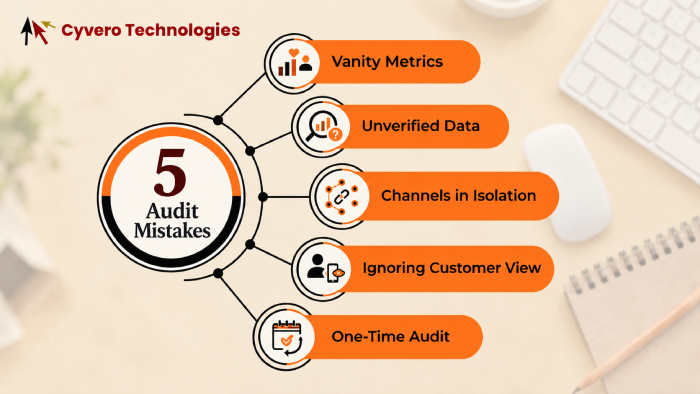
5 Common Digital Marketing Audit Mistakes
A good audit can still fall flat if it's done the wrong way. These are the five mistakes we see most often, and each one is easy to avoid once you know it's there.
1. Judging by vanity metrics
Followers, impressions, and page views feel good, but they don't pay bills. Anchor your review on leads, sales, and cost per acquisition.
2. Trusting data you haven't verified
We've seen businesses make budget decisions based on reports where conversions were counted twice or not at all. Always confirm your tracking before drawing conclusions.
3. Reviewing each channel in isolation
Customers rarely use just one channel. Someone might discover you on social media, search your name later, and finally buy after an email. Looking at channels together shows how they support each other.
4. Forgetting the customer's point of view
Numbers show what happened, not why. Walk through your own site on a phone, fill out your own forms, read your own emails, and ask a few customers what nearly stopped them from buying.
5. Treating the audit as a one-time event
The audit only matters if the fixes happen. Without owners, deadlines, and a follow-up review, most findings quietly disappear within a month.
When to Call in a Professional
Many businesses can handle a basic audit in-house, especially with the checklists above. An outside expert becomes worthwhile when you lack the time, when your numbers don't add up and nobody can explain why, when you're spending significant money on ads, or when you want an unbiased view of work your own team has been doing. A fresh set of eyes often spots problems that people who see the same dashboards every day have stopped noticing.
Our team at Cyvero Technologies offers digital marketing, SEO, email marketing, and website optimization services, and we're happy to review your setup and point you toward the quickest wins.
Frequently Asked Questions
Still have questions before you start? Here are quick answers to the ones we hear most from business owners and marketing teams.
How long does a digital marketing audit take?
For a small or mid-sized business, expect roughly two to three weeks from gathering access to delivering the final report. Larger accounts with many campaigns and pages can take longer.
How much does a digital marketing audit cost?
A do-it-yourself audit with free tools costs only your time. Professional audits vary widely based on the size of your business and how deep the review goes, so ask for a clear scope before you agree to a price.
Can I do a digital marketing audit myself?
Yes. If you have access to your accounts and set aside focused time, you can work through the checklist in this guide. Consider outside help if the data feels unreliable or the budget at stake is large.
What's the difference between an SEO audit and a digital marketing audit?
An SEO audit focuses only on how well your website performs in search engines. A digital marketing audit is broader and covers your website, tracking, content, and every active channel, including paid ads, social media, and email.
What should I do right after the audit?
Choose the top five to seven fixes, assign an owner and a deadline to each, and schedule a progress check within two weeks. Momentum matters most in the first month.
Final Thoughts
Marketing that isn't growing usually isn't broken everywhere. It's leaking in a few specific places, and an audit shows you where. Start with your goals, verify your data, check the foundation, hold every channel to a clear standard, and turn your findings into a short, ranked plan with real owners and dates.
If you'd like expert help, contact Cyvero Technologies for a digital marketing review. We'll help you find what's holding your growth back and build a practical plan to fix it.