



You spent weeks on your website. The design looks sharp, the copy is clear, and your products or services are exactly what customers need. Yet traffic isn't turning into sales, and your analytics show people leaving after a few seconds. Before you rewrite another headline or redo your ad campaign, check one thing: how fast your site loads.
Page speed is one of the most overlooked reasons businesses lose revenue online. Visitors rarely complain about a slow site. They just leave, and they usually go straight to a competitor. In this guide, we'll explain what page speed is, how it affects your sales and search rankings, how to measure it, and what you can do to fix it. We've worked on websites across many industries, and the same handful of problems show up again and again. The good news is that most of them are fixable.
What Is Page Speed, Really?
Page speed is how quickly your web page loads and becomes usable. It isn't one single number, which is where many business owners get confused. A page can show its first image quickly and still feel sluggish when you try to tap a button.
Google measures the real-world experience through three metrics called Core Web Vitals:
- Largest Contentful Paint (LCP): how long it takes for the main content, such as a hero image or headline, to appear. Google considers 2.5 seconds or less good.
- Interaction to Next Paint (INP): how quickly the page responds when someone taps, clicks, or types. A good score is 200 milliseconds or less.
- Cumulative Layout Shift (CLS): how much the page jumps around while loading. You want a score of 0.1 or lower.
If you've ever tried to tap "Add to Cart" and had the button shift at the last second so you hit something else, you've experienced poor CLS. It's frustrating, and customers remember it.
How Page Speed Affects Your Sales
Here's the simple version: every extra second of waiting gives a visitor one more reason to leave. The research on this is consistent.
- Google's research on mobile behavior found that the probability of a visitor bouncing increases by 32% as load time goes from one second to three seconds. At five seconds, it rises by 90%.
- A Portent study of more than 100 million page views found that e-commerce sites loading in one second converted at roughly three times the rate of sites loading in five seconds.
- A Deloitte and Google study, "Milliseconds Make Millions," found that improving mobile load speed by just 0.1 seconds increased retail conversions by 8.4% and average order value by 9.2%.
These numbers vary by industry and study design, so treat them as directional, not guaranteed. But the pattern is hard to ignore. Faster sites make more money.
Slow speed hurts more than conversions
Speed shapes the whole customer experience:
- First impressions. People judge credibility in seconds. A slow site feels outdated or untrustworthy, even if your business is excellent.
- Mobile shoppers. Most online traffic now comes from phones, often on average connections rather than fast office Wi-Fi. A site that feels fine on your laptop can crawl on a mid-range phone.
- Checkout abandonment. Slow checkout pages are especially costly. Someone ready to pay is also someone with little patience for a spinning wheel.
- Ad spend. If you pay for traffic through Google or social ads, a slow landing page wastes money. You've paid for the click, and then lost the visitor before the page even finished loading. Our digital marketing audit checklist can help you spot where else your budget is leaking.
- Repeat business. Customers who have a frustrating experience are less likely to return, and less likely to recommend you.
Page Speed and SEO: The Connection
Google has confirmed that page experience, including Core Web Vitals, is a ranking signal. It matters for local visibility too, as we explain in our guide on how to rank higher on Google Maps. To be fair, speed is not the strongest factor. Relevant, helpful content still matters most. But when two pages are similarly useful, the faster, smoother one has an edge.
There's also an indirect benefit. When visitors stay longer, scroll further, and click more pages, those behaviors tend to go hand in hand with better performance in search. Speed supports almost every other marketing effort you make, from SEO to paid ads to email campaigns.

How to Check Your Website Speed
You can't fix what you haven't measured. These free tools are a good starting point:
- Google PageSpeed Insights: shows both lab data and real-user data from Chrome, along with specific suggestions.
- Google Search Console (Core Web Vitals report): shows which pages across your whole site have problems.
- GTmetrix or WebPageTest: provide detailed "waterfall" charts showing exactly what loads and when.
- Lighthouse (built into Chrome DevTools): useful for developers testing changes.
A few tips from experience:
- Test on mobile first. That's where most problems appear.
- Test several pages, not just your homepage. Product pages, blog posts, and checkout often perform very differently.
- Don't chase a perfect 100 score. A score is a guide. What matters is whether real users have a fast, stable experience.
- Run tests more than once. Results can fluctuate.
What Usually Makes a Website Slow?
When we audit slow websites, the causes tend to fall into the same few buckets:
- Oversized images. A single uncompressed photo straight from a camera can weigh several megabytes. This is the most common issue we see.
- Cheap or overloaded hosting. If your server takes a long time to respond, no amount of front-end tuning will fully fix it.
- Too many plugins or scripts. Every plugin, chat widget, tracking pixel, and font adds weight. Many sites run tools nobody remembers installing.
- Bloated themes and page builders. Some multipurpose themes load huge amounts of code for features you never use.
- No caching. Without caching, the server rebuilds each page from scratch for every visitor.
- Render-blocking code. CSS and JavaScript that must load before anything appears keep visitors staring at a blank screen.
- Unoptimized databases. Over time, WordPress and e-commerce databases collect old revisions, spam comments, and expired data.
- Third-party scripts. Ads, social feeds, and analytics tools often slow a page more than your own code does.
9 Practical Ways to Speed Up Your Website
You don't need a complete rebuild to make your website faster. In most cases, a handful of focused changes deliver the biggest gains. The nine fixes below are ordered roughly by impact and effort: start with images, hosting, and caching, then move on to code cleanup and layout stability. Work through them one at a time and re-test with PageSpeed Insights after each change, so you know exactly what moved the needle.
1. Compress and resize your images
Resize images to the size they are actually displayed, then compress them. Use modern formats like WebP or AVIF, which are much smaller than traditional JPEG and PNG files at similar quality. This single step often delivers the biggest improvement.
2. Use lazy loading
Lazy loading tells the browser to load images and videos only when a visitor scrolls near them. One caution: do not lazy load your main hero image, since that's usually your LCP element and it needs to load right away.
3. Upgrade your hosting
Shared hosting is fine for a small brochure site, but a growing business or online store usually needs better resources. Look for hosts with solid-state storage, current PHP versions, built-in caching, and a good track record on server response time.
4. Set up caching
Caching saves a ready-made copy of your pages so the server doesn't rebuild them each time. Browser caching also stores static files on a visitor's device, making return visits much faster.
5. Use a Content Delivery Network (CDN)
A CDN stores copies of your files on servers around the world and serves them from the location closest to each visitor. This is especially valuable if your audience spans multiple regions, such as the US, UK, and India. The same goes for e-learning platforms, where students stream video lessons from different countries.
6. Minify and clean up your code
Minification strips unnecessary spaces and comments from CSS, JavaScript, and HTML. Also remove code you no longer use. Deferring non-critical JavaScript lets the visible part of the page load first.
7. Audit your plugins and third-party scripts
Go through every plugin and script and ask a simple question: is this earning its place? Remove anything unused, and replace heavy plugins with lighter alternatives. A tracking tool that nobody checks is just dead weight.
8. Optimize your fonts
Custom fonts look great but can slow things down. Limit the number of font families and weights, host them locally if possible, and use font-display: swap so text appears immediately.
9. Reserve space for content to prevent layout shifts
Set width and height attributes on images and embeds so the browser knows how much room to leave. This keeps your CLS score healthy and prevents annoying jumps.
Speed Tips Specific to WordPress
Since many of our clients use WordPress, here are a few extra pointers:
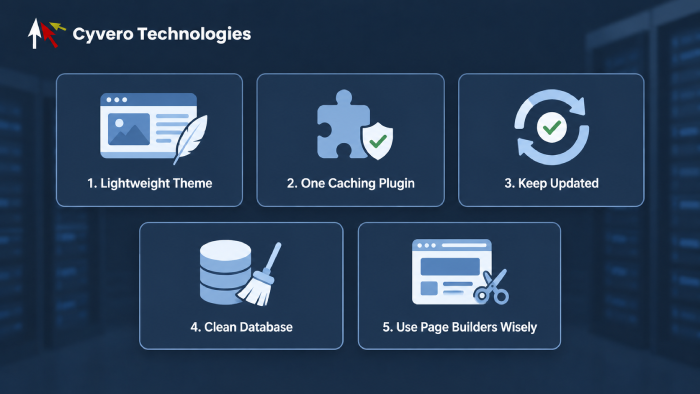
- Choose a lightweight, well-coded WordPress theme rather than a heavy all-in-one theme.
- Use a reputable caching plugin, and don't stack several that overlap.
- Keep WordPress, themes, and plugins updated, since updates often include performance and security improvements.
- Clean your database regularly, including post revisions and transients.
- Be selective with page builders. They offer flexibility, but they can add significant code if used carelessly.
Common Mistakes to Avoid
Even well-meaning optimization efforts can backfire. Over the years, we've seen the same missteps cost businesses time, money, and sometimes even their sales. Knowing what to avoid will save you from repeating them.
- Installing a "speed plugin" and calling it done. Plugins help, but they can't fix oversized images or poor hosting by themselves.
- Optimizing only for desktop. Most of your customers are likely on mobile.
- Ignoring real-user data. Lab scores are useful, but field data from actual visitors tells the true story.
- Making changes without testing. Aggressive minification or script deferral can break layouts and checkout. Test on a staging site first and back up before making changes.
- Treating speed as a one-time project. Every new plugin, image, or feature can slow things down again. Check performance regularly.
When Should You Call a Professional?
Many improvements, like compressing images or removing unused plugins, are well within reach for a business owner. But some problems go deeper: a poorly built theme, a slow database, complex JavaScript, or a custom application that needs restructuring. If you've tried the basics and your scores or sales haven't improved, an experienced development partner can trace the bottleneck faster than guesswork will.
Our team at Cyvero Technologies regularly works on performance audits, website optimization, and custom builds designed to be fast from the start. If you'd like a second pair of eyes on your site, we're happy to take a look.
Frequently Asked Questions
What is a good page load time?
Aim for your main content to appear within 2.5 seconds on mobile. Under three seconds overall is a reasonable target for most business sites. Faster is better, but the biggest gains come from moving out of the "slow" range.
Does page speed really affect sales?
Yes. Multiple industry studies link faster load times to lower bounce rates and higher conversion rates. The impact is largest on mobile and on e-commerce checkout pages.
Is page speed a Google ranking factor?
Yes, as part of Google's page experience signals, including Core Web Vitals. It's one factor among many, and helpful content remains the priority, but speed can be a tiebreaker between similar pages.
How often should I test my website speed?
Test at least once a month, and always after major changes such as a redesign, new plugin, or new tracking script. Your Search Console report can also alert you to new issues.
Will a CDN fix my slow website?
A CDN helps, especially for global audiences, but it won't solve problems like slow hosting, huge images, or heavy code. Think of it as one part of a complete approach.
Final Thoughts
A slow website quietly drains revenue. Visitors leave, ad budgets get wasted, and search rankings suffer, all without a single complaint reaching your inbox. The reverse is also true: faster pages build trust, keep people engaged, and turn more visitors into customers.
Start simple. Run your site through PageSpeed Insights, fix the biggest issues first, usually images, hosting, and unnecessary scripts, and measure again. Small, steady improvements add up. Once your pages are fast, keep visitors coming with a 30-day social media content calendar.
If you'd rather have an expert handle it, contact Cyvero Technologies for a website performance review. We'll help you find what's slowing you down and build a clear plan to fix it.